
Interviews Subtab
Last updated
1. Overall Process & Purpose
What This Subtab Does
The Interviews subtab provides a centralized view of all interview-related records for an applicant. It displays both scheduled interview events and interview availability requests, allowing recruiters to quickly track interview activity without navigating away from the job application.
Why This Subtab Exists
This subtab exists to:
- Centralize all interview scheduling information
- Provide quick access to interview records
- Ensure transparency across interview stages
- Eliminate reliance on email or calendar searches
Value Provided
- Recruiters can quickly verify interview status and history
- Hiring Managers gain visibility into interview scheduling
- HR benefits from a complete, traceable interview record
2. Definitions
| Term | Definition |
|---|---|
| Interviews Subtab | Section displaying all interview-related records |
| ATS Interview Event | Scheduled interview with a fixed date and time |
| ATS Interview Request | Availability-based interview request |
| Interview Stage | The interview step associated with the record |
| Interview Date | Scheduled or proposed interview date |
3. Step-by-Step Directions
Step 1: Access the Interviews Subtab
- Open the applicant’s Job Application
- Scroll to the bottom of the record
- Select the Interviews subtab
This subtab is available at all stages but populates as interviews are created.
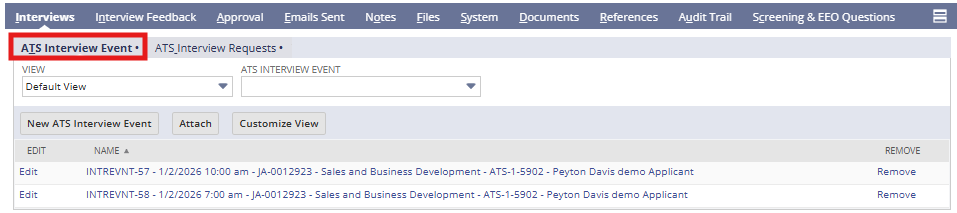
Step 2: Review ATS Interview Events
Under ATS Interview Event, you may see:
- Interview name
- Interview stage
- Date and time
- Duration
- Link to the interview record
- Cancel Interview Event
System Behavior
- Each scheduled interview generates one interview event
- Clicking the event opens the full interview record
Step 3: Review ATS Interview Requests
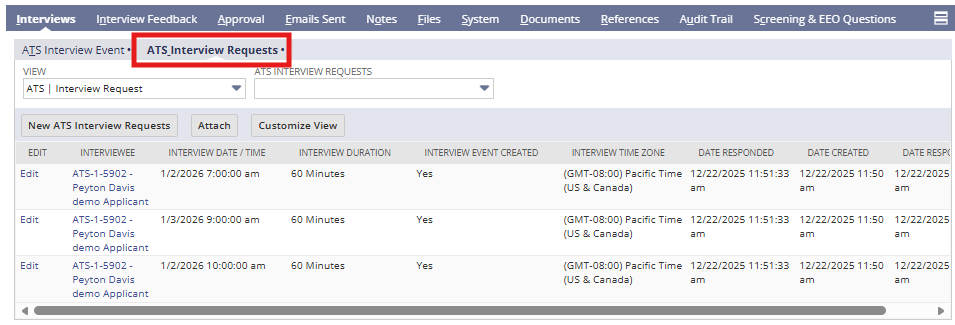
Under ATS Interview Request, you may see:
- Proposed interview dates and times
- Interview stage associated with the request
- Status of candidate response
Key Notes
- Multiple proposed times may be listed
- Once the applicant selects a time:
- An interview event is created
- The request remains visible for reference
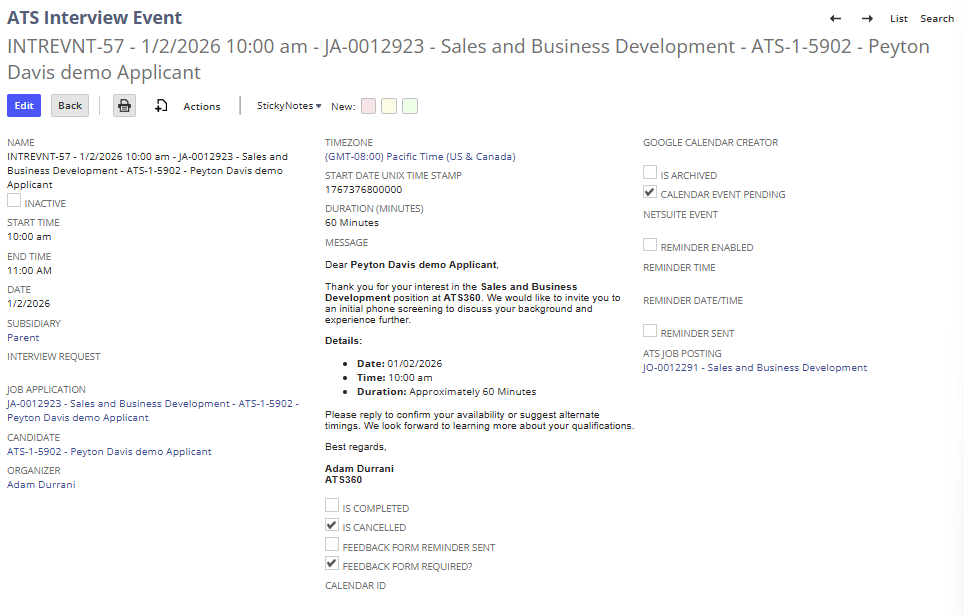
Step 4: Navigate to an Interview Record
- Click any interview event or request
- Review:
- Interview details
- Email content sent
- Interviewers
- Notes and files
- Reminder settings
- Cancel an interview event, by checking the cancellation checkbox on the interview record, if you need to reschedule the interview.
Step 5: Use the Subtab for Verification
Recruiters should reference this subtab to:
- Confirm interviews were scheduled
- Validate interview completion
- Quickly locate interview details
- Support approvals and hiring decisions
4. Summary of Outcome
When the Interviews Subtab is used correctly:
- All interview activity is visible in one location
- Recruiters can quickly confirm interview status
- Interview history remains accessible throughout the workflow
- No interview data is lost or duplicated
The Interviews Subtab serves as the authoritative interview tracking hub within ATS360.