
Calendar Integrations
Last updated
1. Overall Process & Purpose
What This Feature Does
The Calendar Integration feature connects ATS360 interview events with users’ external calendars (such as Google Calendar). When an interview is scheduled through ATS360, the system automatically sends calendar notifications to interviewers so the event appears on their personal calendars.
Why This Feature Exists
Calendar integration exists to:
- Prevent missed or double-booked interviews
- Reduce manual calendar entry
- Ensure interviewers have real-time visibility into scheduled interviews
Value Provided
- Recruiters do not need to manually add calendar events
- Interviewers see interviews directly in their calendars
- HR benefits from consistent scheduling and reduced errors
2. Definitions
| Term | Definition |
|---|---|
| Calendar Integration | Connection between ATS360 and external calendars |
| Interview Event | Scheduled interview created in ATS360 |
| Calendar Notification | Event invite sent to an interviewer’s calendar |
| Time Zone Sync | Automatic alignment between ATS360 and calendar time zones |
3. Step-by-Step Directions
Step 1: Confirm Calendar Integration Is Enabled
Calendar integration is configuration-dependent.
- If enabled, no recruiter action is required to activate it
- If not enabled, interview events will still be created in ATS360 but will not sync to external calendars
Step 2: Create an Interview Event
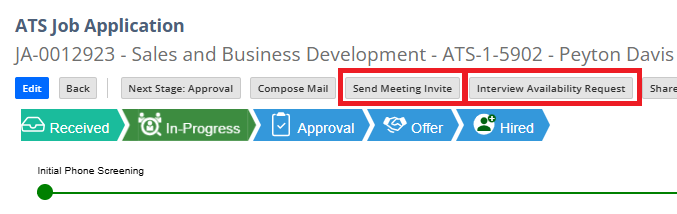
Calendar integration applies when interviews are scheduled using:
- Send Meeting Invite
- Interview Availability Request (after candidate confirms availability)
No additional steps are required during scheduling.
Step 3: System Sends Calendar Notifications
Once the interview event is created:
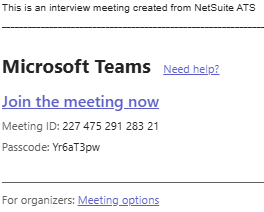
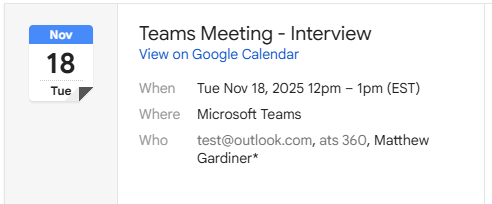
- ATS360 sends a calendar notification to:
- All assigned interviewers
- The interview appears automatically on their external calendars
System Behavior
- The calendar event reflects:
- Interview date
- Start time and duration
- Time zone
- Any reminders configured in ATS360 are included
Step 4: Review Interview Details in ATS360
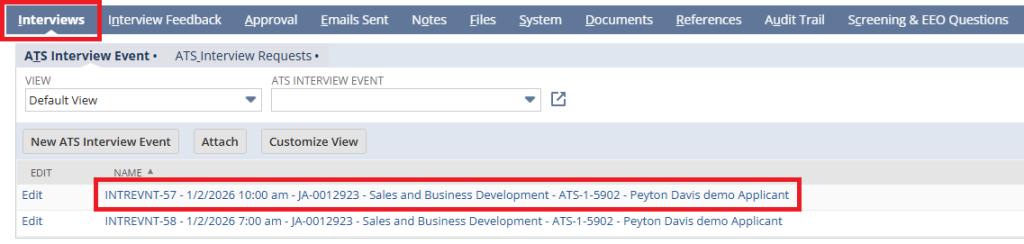
- Open the applicant’s Job Application
- Navigate to the Interviews subtab
- Click the Interview Event
This record acts as the system-of-record even when calendar integration is enabled.
Step 5: Handle Updates or Changes
If interview details are changed in ATS360:
- Updated calendar notifications are sent automatically
- Interviewers’ calendars reflect the changes
4. Summary of Outcome
When Calendar Integration is enabled and used correctly:
- Interview events automatically appear on interviewers’ calendars
- Scheduling errors and missed interviews are reduced
- ATS360 remains the authoritative source for interview records
- Recruiters avoid duplicate calendar management
Calendar integration ensures accurate, synchronized interview scheduling across ATS360 and external calendar tools.