
Interview Feedback Forms
Last updated
1. Overall Process & Purpose
What This Feature Does
The Interview Feedback feature captures structured evaluations from interviewers after each interview stage. Feedback is collected using standardized forms that record ratings, recommendations, and written comments, all of which are stored directly on the applicant record.
Why This Feature Exists
Interview feedback exists to:
- Standardize how interviewers evaluate candidates
- Reduce bias by using consistent scoring criteria
- Centralize interviewer input for recruiter and hiring manager review
- Create a documented decision trail
Value Provided
- Recruiters receive clear, comparable feedback across interviewers
- Hiring Managers gain structured insight to support hiring decisions
- HR benefits from documented evaluations and audit-ready records
2. Definitions
| Term | Definition |
|---|---|
| Interview Feedback Form | Structured form sent to interviewers |
| Rating Scale | Numeric scale (1–5) used to score candidates |
| Proceed Recommendation | Indicator of whether the interviewer recommends advancing the candidate |
| Interviewer Notes | Free-text comments entered by the interviewer |
| Interview Feedback Subtab | Location where completed feedback is stored |
3. Step-by-Step Directions
Step 1: Feedback Form Is Sent Automatically
When an interview is scheduled:
- The Interview Feedback Form is automatically sent to interviewers
- This occurs when:
- A Meeting Invite is created, or
- An Availability Request is sent and confirmed
Recruiters are prompted to confirm sending the feedback form during scheduling.
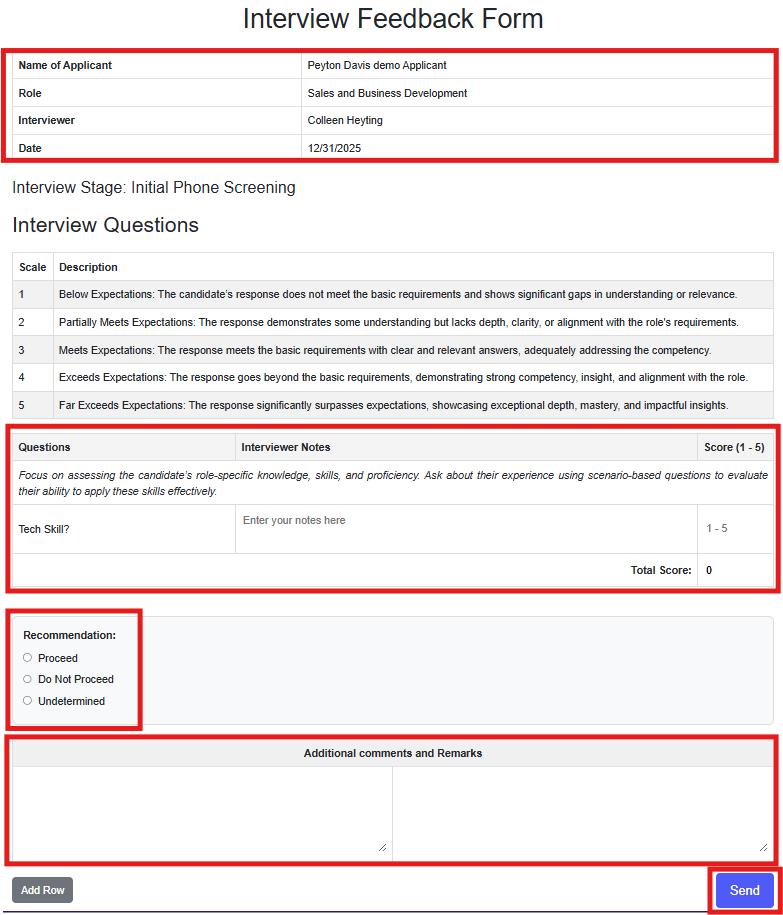
Step 2: Interviewer Completes the Feedback Form
From the interviewer’s perspective:
- Open the feedback form link received via email
- Review:
- Applicant name
- Job role
- Interview stage
- Interview date
- Answer configured interview questions
- Provide:
- Numeric rating (1–5)
- Proceed or do-not-proceed recommendation
- Optional written remarks
- Click Send
All questions may be optional depending on configuration.
Step 3: System Processes the Feedback
After submission:
- The feedback form status initially appears as Pending
- Within moments, the status updates to Completed
- The completed form is linked to the applicant record
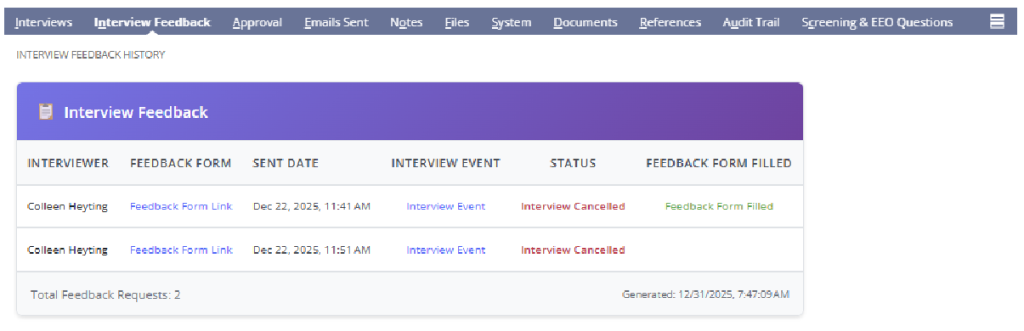
Step 4: Review Feedback on the Application Record
- Open the applicant’s Job Application
- Navigate to the Interview Feedback subtab
You will see:
- Interviewer name
- Feedback form link
- Rating score
- Recommendation
- Associated interview event
Step 5: Use Feedback to Progress the Applicant
Recruiters may use feedback to:
- Advance the applicant to the next interview stage
- Move the applicant to Approval
- Reject or hold the applicant
Feedback does not automatically move the applicant forward.
4. Summary of Outcome
When Interview Feedback is completed correctly:
- Interviewer evaluations are fully documented
- Feedback is visible to recruiters and hiring managers
- Interview stages can be completed with confidence
- Hiring decisions are supported by structured data
The Interview Feedback feature ensures consistent, transparent, and reviewable candidate evaluations within ATS360.