
Screening and EEO Questions
Last updated
1. Overall Process & Purpose
This article helps to create and define the questions candidates must answer when applying to a job posting. These questions help recruiters assess minimum qualifications and collect required compliance information during the application process.
This article exists to help you:
- Gather job-specific information early in the application process through the addition of Screening Questions
- Support consistent candidate screening
- Meet Equal Employment Opportunity (EEO) compliance requirements
Value Provided
- Recruiters receive standardized responses that simplify early screening.
- Hiring Managers gain clearer insight into candidate qualifications before interviews.
- HR & Administrators ensure compliance and consistent data collection across job postings.
2. Definitions
Screening Question A job-related question presented to candidates during the application process to assess qualifications, experience, or eligibility.
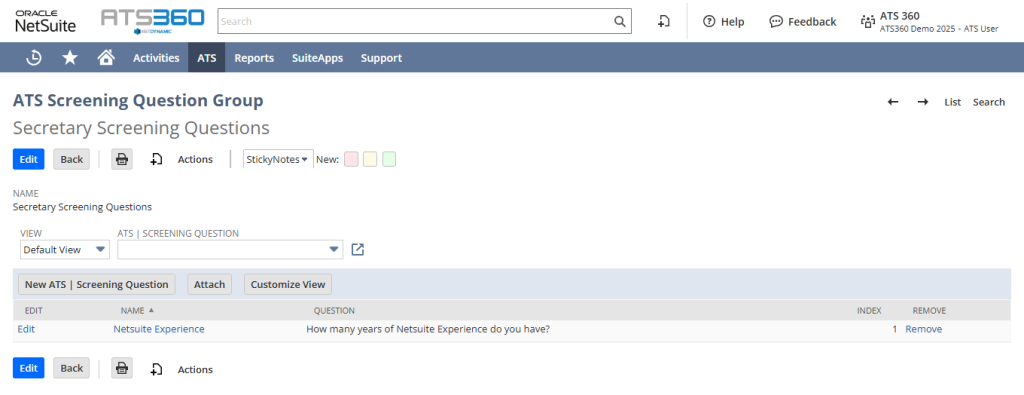
Screening Question Group A reusable set of screening questions that can be assigned to one or more job postings.
EEO Question A compliance-related question used to collect Equal Employment Opportunity data from candidates.
EEO Question Group A predefined set of EEO questions presented separately from screening questions during application that can be assigned to one or more job postings.
Question Type Defines how candidates respond to a question (e.g., Dropdown, Option, Text, Checkbox).
Mandatory Question A question that must be answered before a candidate can submit their application.
Easy Apply Portal The candidate-facing application interface where screening and EEO questions are displayed and answered.
3. Step-by-Step Directions
Creating a Screening Question Group or an EEO Question Group and questions are identical processes. Please refer to the steps below for both functionalities.
Step 1: Access the Question Management Area
- Navigate to ATS Overview.
- Locate the desired Job Posting using the Job Posting Tile Filters on the Dashboard.
- Click the Job Title to open the record.
- Click the Box icon next to the Screening Questions Group field to edit that specific set of questions, or click the Plus icon to create a new group.

Step 2: Create a Screening Question Group
- Click the Plus icon next to the Screening Questions Group field to create a new group**.**
- Enter a Group Name.
- Save the group.
System Behavior:
- The group becomes available for assignment to job postings.
- Questions appear during the first step of the Easy Apply Portal.
- EEO questions are displayed in a separate step after screening questions.
- EEO responses are stored separately for reporting and compliance purposes.

Step 3: Create Individual Screening Questions
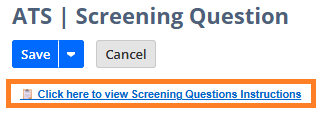
Additional in-depth instructions are also provided within NetSuite in the New ATS| Screening Question record by clicking the Click here to view Screening Questions Instructions button.
To create new screening questions:
- Click the New ATS | Screening Question button within an ATS Screening Question Group record.
- Enter the Name of the question (Internal name).
- Enter the Question Text as it should appear to candidates.
- Select a Question Type (e.g., Dropdown, Option, Text, Checkbox).
- If applicable, define available answer options using a comma-delimited list.
- Mark the question as Required if candidates must answer it to submit their application.
- Save the question.
- Repeat steps 1–6 to add additional questions to the group.
System Behavior:
- Each question is saved within the group and is reusable across job postings.
- Questions appear during the first step of the Easy Apply Portal in the order listed within the group.
Step 4: Assign Question Groups to a Job Posting
- Open the desired Job Posting.
- Locate the Screening Question Group field.
- Select the appropriate Screening Question Group.
- Locate the EEO Question Group field.
- Select the appropriate EEO Question Group.
- Save the Job Posting.
System Behavior:
- Assigned questions appear automatically on the Easy Apply Portal.
- If no group is assigned, that step is skipped for candidates.
4. Summary of Outcome
When Screening and EEO Questions are configured correctly:
- Candidates are prompted with relevant questions during application.
- Recruiters receive structured responses for early screening.
- EEO data is collected consistently and securely.
- Job postings follow standardized and compliant application workflows.
This stage ensures both effective screening and regulatory compliance without adding unnecessary friction to the candidate experience.