
Closing or Unpublishing a Job Posting
Last updated
1. Overall Process & Purpose
This article covers the process to close or unpublish a Job Posting in ATS360 when a job is no longer visible to candidates and when hiring activity for the role is formally concluded in ATS360.
The purpose of properly Closing or Unpublishing a Job Posting is to:
- Prevent additional applications when a role is filled or paused
- Clearly document hiring outcomes
- Maintain accurate reporting and historical records
Value Provided
- Recruiters can stop candidate intake at the appropriate time without losing existing data.
- Hiring Managers gain clarity on when hiring activity has ended.
- HR & Administrators ensure accurate job lifecycle tracking, compliance, and reporting.
2. Definitions
| Title | Description |
|---|---|
| Job Status | The system-controlled state of the job posting (e.g., Open, Closed). Job Status determines whether hiring activity can continue. |
| Portal Link Active | A checkbox that controls whether the job posting is visible and accessible to candidates on career portals and job boards. |
| Closed Date | The system-generated date indicates when the job posting was formally closed. |
| Reason for Closed Opening | A required system value that records why the job was closed (e.g., Position Filled, Position Cancelled). Used for reporting and audit purposes. |
| Existing Applications | Applications already submitted before a job is unpublished or closed. These remain accessible after unpublishing. |
3. Step-by-Step Directions
Step 1: Access the Job Posting
- Navigate to ATS Overview.
- Locate the desired Job Posting using the Job Posting Tile Filters on the Dashboard.
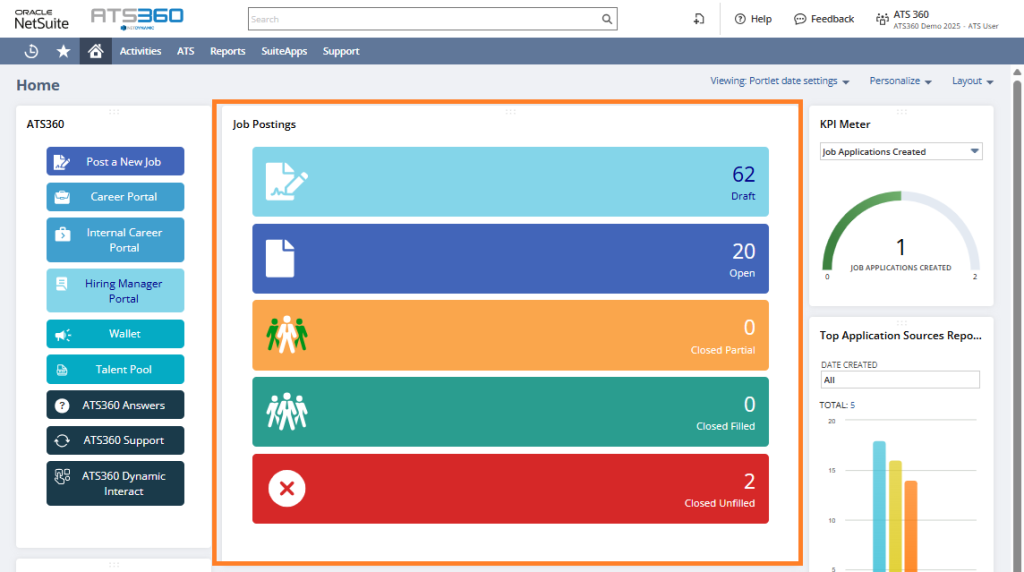
- Click the View or Edit buttons to open the record.
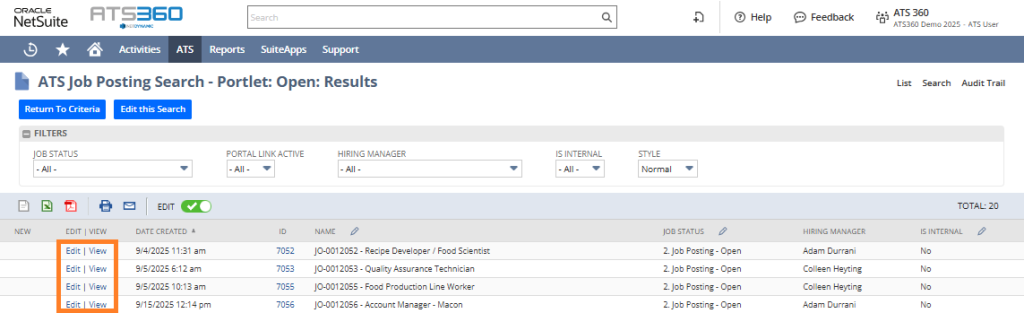
System Behavior: The Job Posting opens with all current details and subtabs available.
Step 2: Unpublish a Job Posting (Temporarily Stop Applications)
Unpublishing a job removes it from candidate-facing portals while keeping the job open internally to manage existing applications.
- Open the Job Posting record.
- Locate the Portal Link Active checkbox.
- Uncheck Portal Link Active.

- Click Save.
System Behavior:
- The job is removed from external and internal career portals.
- The job remains Open internally.
- Existing applications remain accessible.
- New candidates cannot apply.
IMPORTANT Use This Option When:
- Hiring is temporarily paused, or
- You need to stop applications without closing the job, but still need to process existing applications.
Step 3: Close a Job Posting (End Hiring Activity)
Closing a job formally ends hiring activity for the position.
- Open the Job Posting record.
- Click Close Job Posting.

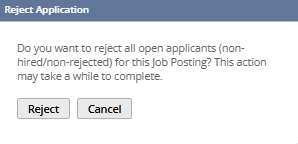
- Confirm if you would like to reject all applicants not currently Hired or Rejected.
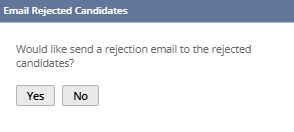
- Confirm if you would like to send a rejection email.
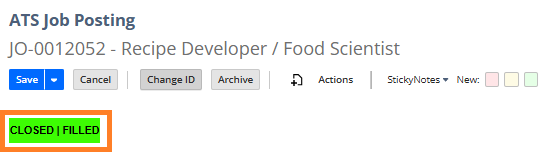
- The Job Posting will be closed and assigned a Closed status according to the Target/Filled headcounts originally selected when creating the job.
System Behavior:
- The system records the Closed Date automatically.
- The job is no longer available for applications.
- All applications remain visible for review and reporting, but are unable to be processed further in the Hiring Process (See Unpublish a Job Posting above to prevent new applications but still retain the ability to process existing applications).
Conditional Paths:
- Jobs will be assigned a Closed status according to the Target/Filled headcounts originally selected when creating the job. Closed | Filled, Closed | Partial, or Closed | Unfilled
- Jobs may be closed with or without a hire.
- Available closure reasons may vary by configuration and are customizable.
4. Summary of Outcome
When a Job Posting is unpublished or closed correctly:
- Candidate intake is stopped at the appropriate time.
- All existing applications and hiring data are retained.
- The job lifecycle is accurately documented in ATS360.
- Reporting and compliance records become complete.
This stage ensures hiring activity is concluded cleanly while preserving all historical information.