
Application Received Stage — AI Score and Explanation
Last updated
1. Overall Process & Purpose
What This Feature Does
The AI Score and AI Match tools in the Received stage provide an automated assessment of how closely an applicant’s resume aligns with the job posting. These tools analyze resume content against job requirements to surface an early, data-driven indication of fit.
Why This Feature Exists
AI scoring exists to:
- Help recruiters quickly prioritize incoming applications
- Reduce time spent on manual first-pass resume reviews
- Provide consistent, objective comparison across applicants
Value Provided
- Recruiters can triage candidates more efficiently
- Hiring Managers gain an additional data point to support decisions
- HR benefits from standardized evaluation criteria across roles
AI scoring is intended to support, not replace, recruiter judgment.
2. Definitions
| Term | Definition |
|---|---|
| AI Ranking | A 1–5 numeric score indicating overall fit |
| AI Match | A percentage-based comparison between resume and job description |
| Parsed Resume Data | Resume content extracted by the system |
| Job Description | Requirements and responsibilities defined on the job posting |
| Screening Flags | Rule-based indicators separate from AI scoring |
3. Step-by-Step Directions
Step 1: Locate the AI Ranking
- Open a Job Application in the Received stage
- Review the AI Ranking field on the main application form
What You’ll See
- A score from 1 (lowest fit) to 5 (highest fit)
System Behavior
- The score is generated automatically
- It updates based on resume parsing and job posting data
- Recruiters cannot manually edit this value
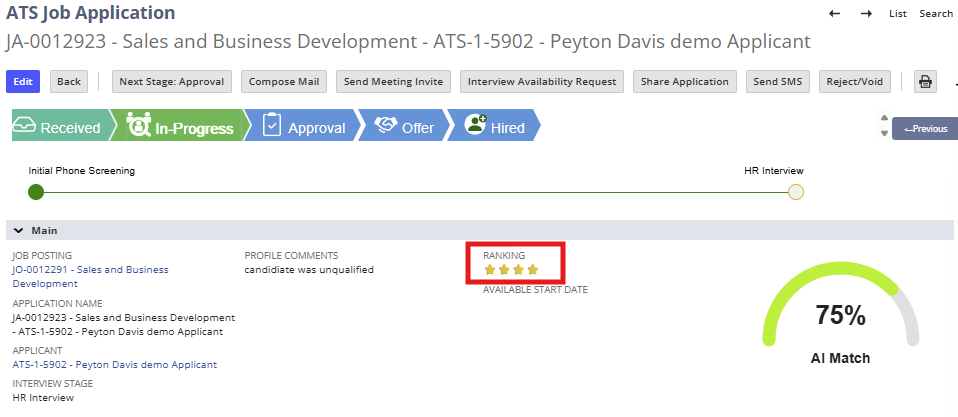
Step 2: Review the AI Match Percentage
- Locate the AI Match section on the application record
What This Represents
- A percentage indicating similarity between:
- Applicant resume
- Job description content
Example
- A higher percentage suggests stronger alignment with listed skills, experience, and qualifications
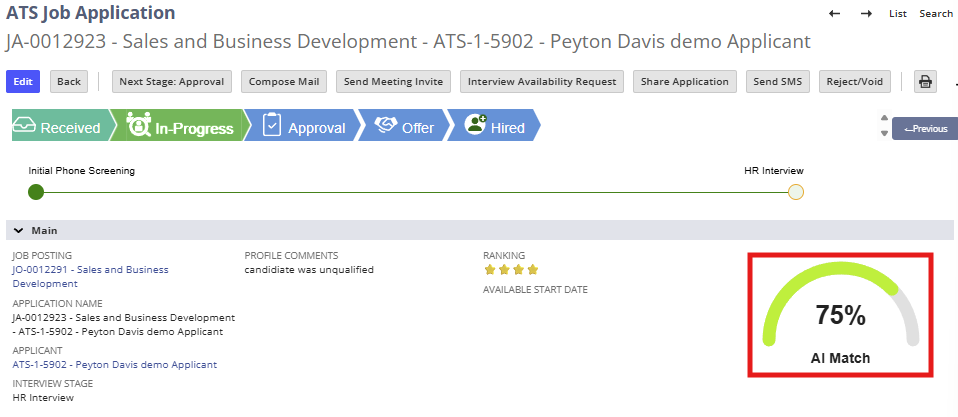
Step 3: Understand How AI Scoring Is Calculated
AI scoring evaluates:
- Skills listed on the resume
- Job titles and experience history
- Education and qualifications
- Keywords and phrasing compared to the job description
Important Notes
- AI scoring is comparison-based, not absolute
- A lower score does not automatically disqualify a candidate
- The system does not evaluate cultural fit, soft skills, or context
Step 4: Use AI Scores in Recruiter Decision-Making
Recommended Usage
- Use AI Ranking as a sorting and prioritization tool
- Combine AI results with:
- Screening question responses
- Resume review
- Recruiter notes
What AI Scores Do Not Do
- They do not automatically progress or reject candidates
- They do not override recruiter actions
- They do not replace interviews or approvals
Step 5: Understand Configuration Dependencies
Configuration Notes
- Job description quality directly impacts score accuracy
- Changes to the job posting do not retroactively recalculate existing scores
4. Summary of Outcome
When AI scoring is reviewed correctly in the Received stage:
- Recruiters gain a fast, consistent indicator of applicant fit
- High-potential candidates can be prioritized earlier
- Manual review time is reduced without losing control
- AI insights are used as guidance, not decision enforcement
The AI Score and Match features provide efficient, objective support to the recruiter’s evaluation process within ATS360.