
Compose an Email
Last updated
1. Overall Process & Purpose
What This Feature Does
The Compose Email feature allows recruiters to send manual, ad-hoc emails to applicants directly from the Job Application record. These emails can be sent at any stage of the hiring process and are automatically logged to the applicant’s history.
Why This Feature Exists
Compose Email exists to:
- Enable direct communication without leaving ATS360
- Keep all applicant correspondence centralized
- Support personalized outreach beyond automated emails
- Maintain a complete communication audit trail
Value Provided
- Recruiters can communicate quickly and contextually
- Hiring Managers gain visibility into applicant communications
- HR benefits from complete, timestamped email records
2. Definitions
| Term | Definition |
|---|---|
| Compose Mail | Button used to send a manual email |
| Email Template | Predefined message with dynamic fields |
| Default HR | System-defined sender email |
| Current User | Logged-in user sending the email |
| Email Sent Subtab | Log of all emails sent for the applicant |
3. Step-by-Step Directions
Step 1: Open Compose Email
- Open the applicant’s Job Application
- Click Compose Mail
You will be taken to the email composition screen.

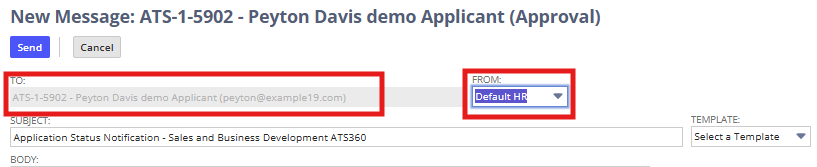
Step 2: Review Recipient and Sender
Auto-Populated Fields
- To: Applicant’s email address
- From: Default HR (can be changed)
Optional Action
- Change sender to Current User if appropriate
Step 3: Select or Edit Email Content
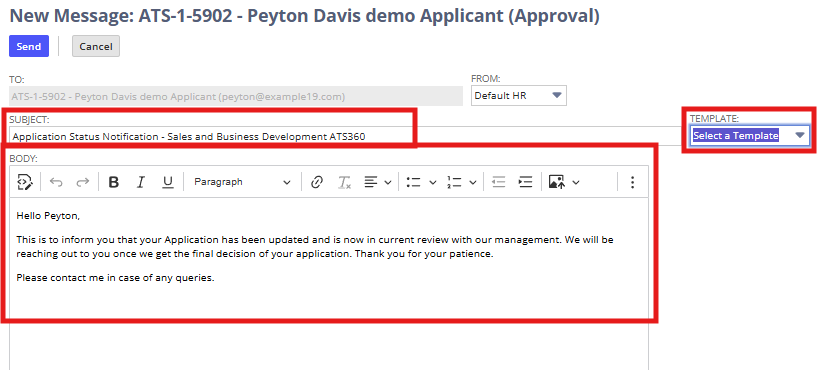
- Choose an Email Template (optional)
- Review and edit:
- Subject
- Email Body
System Behavior
- Templates may include dynamic tags
- Tags populate automatically based on the application record
Step 4: Add Attachments and CCs
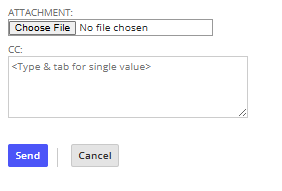
- Attach files from your computer (optional)
- Add CC recipients (optional)
Step 5: Send the Email
- Review all content
- Click Send
Step 6: Verify Email Logging
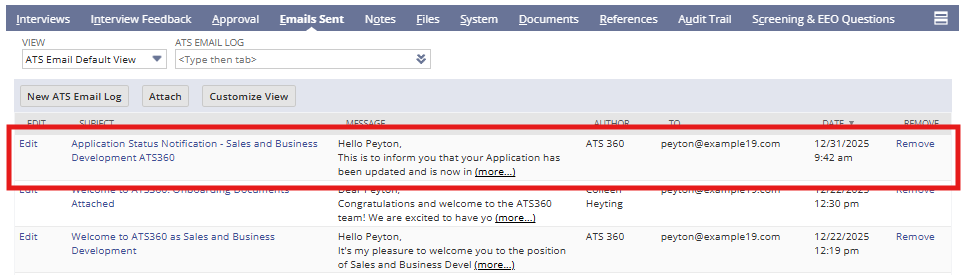
- Return to the Job Application
- Open the Email Sent subtab
The email appears with:
- Timestamp
- Sender
- Subject
- Message content
4. Summary of Outcome
When Compose Email is used correctly:
- The applicant receives direct, timely communication
- The email is permanently logged on the application record
- Recruiters maintain full visibility into outreach
- No external email tracking is required
Compose Email ensures clear, documented communication throughout the ATS360 hiring process.