
Introduction to ATS360
Last updated
Summary: ATS360 is a next-generation Applicant Tracking System built entirely on the NetSuite platform. This article provides an overview of ATS360's core capabilities, explains why native NetSuite integration matters, and introduces the key features that help organizations streamline their entire recruitment lifecycle. This foundational article is intended for recruiters, HR professionals, hiring managers, and administrators who are new to ATS360.
What is ATS360?
ATS360 is a powerful, easy-to-use applicant tracking system designed natively for NetSuite. It serves as a centralized hub for managing every stage of the recruitment lifecycle—streamlining hiring, enhancing collaboration, and enabling smarter decision-making right where your business operates.
By automating repetitive tasks, ATS360 frees up your team's time for more important work, speeding up the hiring process and improving efficiency. The system automatically collects applications, stores resumes, tracks candidates' progress, and organizes crucial data so that your recruiters can focus on finding the perfect fit for your business.
Built for NetSuite. Powered by NetSuite.
ATS360 is a SuiteApp developed on SuiteCloud, Oracle NetSuite's development framework. Unlike bolted-on solutions, ATS360 is natively embedded within your NetSuite instance—ensuring performance, security, and data consistency without compromise.
As a certified and supported SuiteApp, ATS360 is distributed through Oracle NetSuite, delivering a seamless experience with guaranteed platform compatibility and continuous innovation.
🔗 Visit NetSuite’s official SuiteApp store
Why Being Native Matters
Unlike external integrations, ATS360 is built entirely within NetSuite, meaning it works seamlessly with your existing data, workflows, and permissions—no syncs, delays, or third-party connectors required.
| Benefit | Description |
|---|---|
| Real-Time Performance | No data synchronization delays or batch processing—your recruitment data is always current. |
| Built-In Security | Leverages NetSuite's enterprise-grade security, roles, and permissions without additional configuration. |
| Unified User Experience | Recruiters work within the same familiar NetSuite interface—no separate system to learn. |
| Single Source of Truth | All recruitment data lives in NetSuite, eliminating data silos and ensuring consistency. |
Key Features of ATS360
ATS360 offers a powerful suite of features to support every stage of your recruitment journey:
- User-Friendly Dashboard: Gain full visibility of your recruitment process with actionable insights and easy navigation.
- Integrated Career Portals: External portals attract new applicants while internal portals foster employee career growth.
- Job Posting Management: Create, edit, and publish job openings with predefined fields and customizable templates.
- AI-Driven Resume Parsing: Automatically extract skills, certifications, and experience to power smart filtering and talent searches.
- Job Board Advertising: Post directly to 2,500+ job boards globally with integrated budget management via the Wallet function.
- Talent Pool Builder: Build and maintain a searchable database of candidates for current and future opportunities.
- Collaboration Tools: Enable team collaboration with approval groups, comments, and role-based permissions.
- Hiring Manager Portal: Give hiring managers a dedicated interface to review candidates and provide feedback.
- Generate Offer Letters: Create customizable offer letters from templates and send them directly to candidates.
- SuitePeople Integration: Seamlessly sync job requisitions and employee data with NetSuite's HR module.
- Data-Driven Insights: Track KPIs and generate reports to optimize your recruitment strategies.
End-to-End Recruitment Lifecycle
ATS360 manages the entire recruitment process from initial contact to hiring with comprehensive end-to-end features. This ensures a smooth and structured approach to candidate management throughout the recruitment lifecycle.

Application Stages
- Received: Track applications as they are received, ensuring no candidate is overlooked.
- In-Progress: Monitor candidates as they move through initial screening and interview stages.
- Approved: Identify candidates who have been approved for further consideration by hiring managers.
- Offer: Manage the offer process, including the generation, delivery, and acceptance of job offers.
- Hired: Transition candidates from offer acceptance to onboarding seamlessly.
- Rejected: Handle rejections professionally, ensuring candidates receive timely and respectful communication.
New in 2025
To stay ahead of evolving recruitment trends and the expectations of today's hiring teams, ATS360 now includes powerful new features built to streamline interviews, improve coordination, and enhance the candidate journey:
Base Product Enhancements
- Interview Steps: Customizable interview stages to match your hiring process.
- Direct Calendar Integration: Automatic calendar sync for interviewers and candidates.
- Interview Module: Structured feedback forms and interviewer question submission.
Optional Add-Ons
- E-Signature: Candidates can sign offer letters directly from their inbox.
- Pre-Hire Package: Collect federal forms, custom documents, and signatures before the start date.
- E-Verify: Employment eligibility verification for US-based employees.
- SMS Messaging: Real-time text communication with candidates.
Understanding User Roles
ATS360 offers flexible licensing with three distinct user roles, each designed for specific functions within the recruitment process:
| User Role | Primary Users | Key Capabilities |
|---|---|---|
| ATS User | Recruiters, HR Professionals, Talent Acquisition Specialists | Full access to dashboard, job management, talent pool, interview scheduling, offers, and pre-hire functions. |
| Hiring Manager | Department Managers, Team Leads, Interviewers | Access to Hiring Portal, candidate review, stage progression, screening questions, and interview module. |
| ATS Candidate | Job Applicants, External & Internal Candidates | Access to Career Portals to browse jobs, submit applications, and complete screening questions. |
Getting Started with ATS360
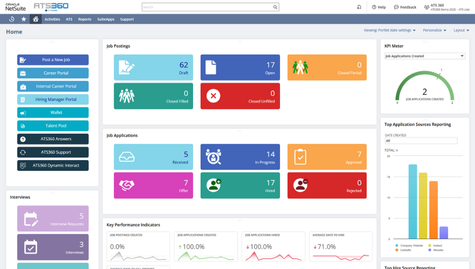
The ATS360 dashboard is your command center for all recruitment activities. From here, you can:
- Access Quick Links to post new jobs, manage applications, view career portals, and more.
- Monitor KPIs to track recruitment performance and ensure hiring goals are on target.
- View Reports for valuable insights into your recruitment process.
- Track Job Openings and Applications by stage using the dashboard tiles.
💡 Tips & Best Practices
• Customize your dashboard by selecting 'ATS' from the top menu to personalize your portlets.
• Use Job Description Templates to ensure consistency and save time when creating new job openings.
• Explore the Knowledge Base within ATS360 for detailed articles, documentation, and training videos.
Related Articles
- Navigating the ATS360 Dashboard
- Understanding User Roles: ATS Candidate vs. ATS User vs. Hiring Manager
- Creating a New Job Opening
- Career Portal Overview: The Candidate Gateway
Need Help?
If you have questions or need assistance with ATS360, our support team is here to help:
- Email: ats360@netdynamicinc.com
- Support Hours: Monday - Friday, 9 AM - 5 PM EST
In-App Support: Click 'ATS360 Support' from the Quick Links on your dashboard.