
Approval Stage
Last updated
1. Overall Process & Purpose
What This Stage Does
The Approval Stage introduces a formal review checkpoint in the hiring process where designated approvers must confirm that an applicant is approved to proceed before an offer can be generated. This stage enforces governance and alignment for hiring decisions.
Why This Stage Exists
The Approval Stage exists to:
- Ensure hiring decisions receive appropriate oversight
- Enforce internal controls and approval policies
- Prevent offers from being generated prematurely
- Create a documented decision trail
Value Provided
- Recruiters receive clear approval signals before moving forward
- Hiring Managers participate in structured decision-making
- HR benefits from compliance, accountability, and audit readiness
2. Definitions
| Term | Definition |
|---|---|
| Approval Stage | Workflow stage requiring approval before offer creation |
| Application Approved | Action indicating approval has been granted |
| Approver | User assigned to approve the application |
| Approval Status | Indicator showing pending, approved, or rejected |
| Approval Subtab | Location where approval activity is recorded |
3. Step-by-Step Directions
Step 1: Move Applicant to Approval Stage
- Open the applicant’s Job Application
- Confirm all required interview stages are complete
- Click Next Stage: Approval
System Behavior
- The Approval stage becomes active
- Approval actions become available
- Offer-related actions remain locked

Step 2: Review Assigned Approvers(if enabled)
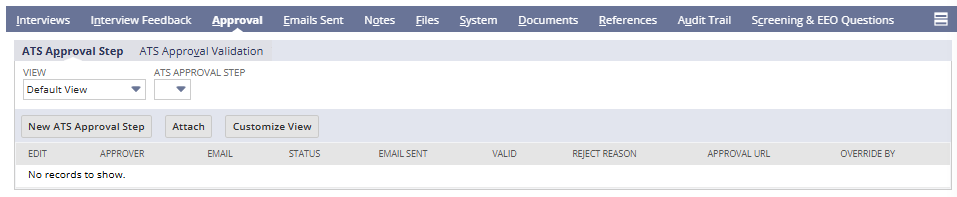
- Scroll to the Approval subtab
- Review the list of assigned approvers
Configuration Note
- Approvers are determined by workflow configuration
- Recruiters cannot modify approvers from the application record
Step 3: Approver Reviews the Application
From the approver’s perspective:
- Open the Job Application
- Review:
- Applicant details
- Interview feedback
- Notes and attachments
- Select Application Approved
Step 4: System Records the Approval
Once approved:
- Approval status updates to Approved
- Approval date and approver name are recorded
- The approval is logged in the Approval subtab
Step 5: Proceed to Offer Stage
After approval:
- Return to the Job Application
- Click Next Stage: Offer
Offer actions (Generate Offer) are now enabled.
4. Summary of Outcome
When the Approval Stage is completed correctly:
- Required stakeholders have formally approved the hire
- Approval details are permanently recorded
- Offer creation is unlocked
- The hiring workflow proceeds in a controlled manner
The Approval Stage provides structured governance and decision control within the ATS360 hiring process.